
768 lines
28 KiB
Plaintext
768 lines
28 KiB
Plaintext
Metadata-Version: 2.1
|
|
Name: pyrate-limiter
|
|
Version: 3.9.0
|
|
Summary: Python Rate-Limiter using Leaky-Bucket Algorithm
|
|
Home-page: https://github.com/vutran1710/PyrateLimiter
|
|
License: MIT
|
|
Keywords: rate,rate-limiter,rate_limiter,ratelimiter,leaky-bucket,ratelimit,ratelimiting
|
|
Author: vutr
|
|
Author-email: me@vutr.io
|
|
Requires-Python: >=3.8,<4.0
|
|
Classifier: Development Status :: 5 - Production/Stable
|
|
Classifier: License :: OSI Approved :: MIT License
|
|
Classifier: Operating System :: OS Independent
|
|
Classifier: Programming Language :: Python :: 3
|
|
Classifier: Programming Language :: Python :: 3.8
|
|
Classifier: Programming Language :: Python :: 3.9
|
|
Classifier: Programming Language :: Python :: 3.10
|
|
Classifier: Programming Language :: Python :: 3.11
|
|
Classifier: Programming Language :: Python :: 3.12
|
|
Classifier: Programming Language :: Python :: 3.13
|
|
Classifier: Topic :: Software Development :: Documentation
|
|
Classifier: Topic :: Software Development :: Libraries :: Python Modules
|
|
Classifier: Typing :: Typed
|
|
Provides-Extra: all
|
|
Provides-Extra: docs
|
|
Requires-Dist: filelock (>=3.0) ; extra == "all"
|
|
Requires-Dist: furo (>=2022.3.4,<2023.0.0) ; extra == "docs"
|
|
Requires-Dist: myst-parser (>=0.17) ; extra == "docs"
|
|
Requires-Dist: psycopg[pool] (>=3.1.18,<4.0.0) ; extra == "all"
|
|
Requires-Dist: redis (>=5.0.0,<6.0.0) ; extra == "all"
|
|
Requires-Dist: sphinx (>=4.3.0,<5.0.0) ; extra == "docs"
|
|
Requires-Dist: sphinx-autodoc-typehints (>=1.17,<2.0) ; extra == "docs"
|
|
Requires-Dist: sphinx-copybutton (>=0.5) ; extra == "docs"
|
|
Requires-Dist: sphinxcontrib-apidoc (>=0.3,<0.4) ; extra == "docs"
|
|
Project-URL: Documentation, https://pyrate-limiter.readthedocs.io
|
|
Project-URL: Repository, https://github.com/vutran1710/PyrateLimiter
|
|
Description-Content-Type: text/markdown
|
|
|
|
<img align="left" width="95" height="120" src="https://raw.githubusercontent.com/vutran1710/PyrateLimiter/master/docs/_static/logo.png">
|
|
|
|
# PyrateLimiter
|
|
|
|
The request rate limiter using Leaky-bucket Algorithm.
|
|
|
|
Full project documentation can be found at [pyratelimiter.readthedocs.io](https://pyratelimiter.readthedocs.io).
|
|
|
|
[](https://badge.fury.io/py/pyrate-limiter)
|
|
[](https://pypi.org/project/pyrate-limiter)
|
|
[](https://codecov.io/gh/vutran1710/PyrateLimiter)
|
|
[](https://github.com/vutran1710/PyrateLimiter/graphs/commit-activity)
|
|
[](https://pypi.python.org/pypi/pyrate-limiter/)
|
|
|
|
<br>
|
|
|
|
## Contents
|
|
|
|
- [Features](#features)
|
|
- [Installation](#installation)
|
|
- [Quickstart](#quickstart)
|
|
- [limiter_factory](#limiter_factory)
|
|
- [Examples](#examples)
|
|
- [Basic usage](#basic-usage)
|
|
- [Key concepts](#key-concepts)
|
|
- [Defining rate limits & buckets](#defining-rate-limits-and-buckets)
|
|
- [Defining clock & routing logic](#defining-clock--routing-logic-with-bucketfactory)
|
|
- [Wrapping all up with Limiter](#wrapping-all-up-with-limiter)
|
|
- [asyncio and event loops](#asyncio-and-event-loops)
|
|
- [Decorators](#as_decorator-use-limiter-as-decorator)
|
|
- [Limiter API](#limiter-api)
|
|
- [Weight](#weight)
|
|
- [Handling exceeded limits](#handling-exceeded-limits)
|
|
- [Bucket analogy](#bucket-analogy)
|
|
- [Rate limit exceptions](#rate-limit-exceptions)
|
|
- [Rate limit delays](#rate-limit-delays)
|
|
- [Backends](#backends)
|
|
- [InMemoryBucket](#inmemorybucket)
|
|
- [MultiprocessBucket](#multiprocessbucket)
|
|
- [SQLiteBucket](#sqlitebucket)
|
|
- [RedisBucket](#redisbucket)
|
|
- [PostgresBucket](#postgresbucket)
|
|
- [BucketAsyncWrapper](#bucketasyncwrapper)
|
|
- [Async or Sync?](#async-or-sync)
|
|
- [Advanced Usage](#advanced-usage)
|
|
- [Component-level Diagram](#component-level-diagram)
|
|
- [Time sources](#time-sources)
|
|
- [Leaking](#leaking)
|
|
- [Concurrency](#concurrency)
|
|
- [Custom backend](#custom-backend)
|
|
|
|
## Features
|
|
|
|
- Supports unlimited rate limits and custom intervals.
|
|
- Separately tracks limits for different services or resources.
|
|
- Manages limit breaches by raising exceptions or applying delays.
|
|
- Offers multiple usage modes: direct calls or decorators.
|
|
- Fully compatible with both synchronous and asynchronous workflows.
|
|
- Provides SQLite and Redis backends for persistent limit tracking across threads or restarts.
|
|
- Includes MultiprocessBucket and SQLite File Lock backends for multiprocessing environments.
|
|
|
|
## Installation
|
|
|
|
**PyrateLimiter** supports **python ^3.8**
|
|
|
|
Install using pip:
|
|
|
|
```
|
|
pip install pyrate-limiter
|
|
```
|
|
|
|
Or using conda:
|
|
|
|
```
|
|
conda install --channel conda-forge pyrate-limiter
|
|
```
|
|
|
|
## Quickstart
|
|
|
|
To limit 5 requests within 2 seconds and raise an exception when the limit is exceeded:
|
|
|
|
```python
|
|
from pyrate_limiter import Duration, Rate, Limiter, BucketFullException
|
|
|
|
limiter = Limiter(Rate(5, Duration.SECOND * 2))
|
|
|
|
for i in range(6):
|
|
try:
|
|
limiter.try_acquire(i)
|
|
except BucketFullException as err:
|
|
print(err, err.meta_info)
|
|
```
|
|
|
|
|
|
|
|
## limiter_factory
|
|
[limiter_factory.py](pyrate_limiter.limiter_factory.py) provides several functions to simplify common cases:
|
|
- create_sqlite_limiter(rate_per_duration: int, duration: Duration, ...)
|
|
- create_inmemory_limiter(rate_per_duration: int, duration: Duration, ...)
|
|
- + more to be added...
|
|
|
|
## Examples
|
|
- Rate limiting asyncio tasks: [asyncio_ratelimit.py](examples/asyncio_ratelimit.py)
|
|
- Rate limiting asyncio tasks w/ a decorator: [asyncio_decorator.py](examples/asyncio_decorator.py)
|
|
- HTTPX rate limiting - asyncio, single process and multiprocess examples [httpx_ratelimiter.py](examples/httpx_ratelimiter.py)
|
|
- Multiprocessing using an in-memory rate limiter - [in_memory_multiprocess.py](examples/in_memory_multiprocess.py)
|
|
- Multiprocessing using SQLite and a file lock - this can be used for distributed processes not created within a multiprocessing [sql_filelock_multiprocess.py](examples/sql_filelock_multiprocess.py)
|
|
|
|
## Basic Usage
|
|
|
|
### Key concepts
|
|
|
|
#### Clock
|
|
|
|
- Timestamps incoming items
|
|
|
|
#### Bucket
|
|
|
|
- Stores items with timestamps.
|
|
- Functions as a FIFO queue.
|
|
- Can `leak` to remove outdated items.
|
|
|
|
#### BucketFactory
|
|
|
|
- Manages buckets and clocks, routing items to their appropriate buckets.
|
|
- Schedules periodic `leak` operations to prevent overflow.
|
|
- Allows custom logic for routing, conditions, and timing.
|
|
|
|
#### Limiter
|
|
|
|
- Provides a simple, intuitive API by abstracting underlying logic.
|
|
- Seamlessly supports both sync and async contexts.
|
|
- Offers multiple interaction modes: direct calls, decorators, and (future) context managers.
|
|
- Ensures thread-safety via RLock, and if needed, asyncio concurrency via asyncio.Lock
|
|
|
|
### Defining rate limits and buckets
|
|
|
|
For example, an API (like LinkedIn or GitHub) might have these rate limits:
|
|
|
|
```
|
|
- 500 requests per hour
|
|
- 1000 requests per day
|
|
- 10000 requests per month
|
|
```
|
|
|
|
You can define these rates using the `Rate` class. `Rate` class has 2 properties only: **limit** and **interval**
|
|
|
|
```python
|
|
from pyrate_limiter import Duration, Rate
|
|
|
|
hourly_rate = Rate(500, Duration.HOUR) # 500 requests per hour
|
|
daily_rate = Rate(1000, Duration.DAY) # 1000 requests per day
|
|
monthly_rate = Rate(10000, Duration.WEEK * 4) # 10000 requests per month
|
|
|
|
rates = [hourly_rate, daily_rate, monthly_rate]
|
|
```
|
|
|
|
Rates must be properly ordered:
|
|
|
|
- Rates' intervals & limits must be ordered from least to greatest
|
|
- Rates' ratio of **limit/interval** must be ordered from greatest to least
|
|
|
|
Buckets validate rates during initialization. If using a custom implementation, use the built-in validator:
|
|
|
|
```python
|
|
from pyrate_limiter import validate_rate_list
|
|
|
|
assert validate_rate_list(my_rates)
|
|
```
|
|
|
|
Then, add the rates to the bucket of your choices
|
|
|
|
```python
|
|
from pyrate_limiter import InMemoryBucket, RedisBucket
|
|
|
|
basic_bucket = InMemoryBucket(rates)
|
|
|
|
# Or, using redis
|
|
from redis import Redis
|
|
|
|
redis_connection = Redis(host='localhost')
|
|
redis_bucket = RedisBucket.init(rates, redis_connection, "my-bucket-name")
|
|
|
|
# Async Redis would work too!
|
|
from redis.asyncio import Redis
|
|
|
|
redis_connection = Redis(host='localhost')
|
|
redis_bucket = await RedisBucket.init(rates, redis_connection, "my-bucket-name")
|
|
```
|
|
|
|
If you only need a single Bucket for everything, and python's built-in `time()` is enough for you, then pass the bucket to Limiter then ready to roll!
|
|
|
|
```python
|
|
from pyrate_limiter import Limiter
|
|
|
|
# Limiter constructor accepts single bucket as the only parameter,
|
|
# the rest are 3 optional parameters with default values as following
|
|
# Limiter(bucket, clock=TimeClock(), raise_when_fail=True, max_delay=None)
|
|
limiter = Limiter(bucket)
|
|
|
|
# Limiter is now ready to work!
|
|
limiter.try_acquire("hello world")
|
|
```
|
|
|
|
If you want to have finer grain control with routing & clocks etc, then you should use `BucketFactory`.
|
|
|
|
### Defining Clock & routing logic with BucketFactory
|
|
|
|
When multiple bucket types are needed and items must be routed based on certain conditions, use `BucketFactory`.
|
|
|
|
First, define your clock (time source). Most use cases work with the built-in clocks:
|
|
|
|
```python
|
|
from pyrate_limiter.clock import TimeClock, MonotonicClock, SQLiteClock
|
|
|
|
base_clock = TimeClock()
|
|
```
|
|
|
|
PyrateLimiter does not assume routing logic, so you implement a custom BucketFactory. At a minimum, these two methods must be defined:
|
|
|
|
```python
|
|
from pyrate_limiter import BucketFactory
|
|
from pyrate_limiter import AbstractBucket
|
|
|
|
|
|
class MyBucketFactory(BucketFactory):
|
|
# You can use constructor here,
|
|
# nor it requires to make bucket-factory work!
|
|
|
|
def wrap_item(self, name: str, weight: int = 1) -> RateItem:
|
|
"""Time-stamping item, return a RateItem"""
|
|
now = clock.now()
|
|
return RateItem(name, now, weight=weight)
|
|
|
|
def get(self, _item: RateItem) -> AbstractBucket:
|
|
"""For simplicity's sake, all items route to the same, single bucket"""
|
|
return bucket
|
|
```
|
|
|
|
### Creating buckets dynamically
|
|
|
|
If more than one bucket is needed, the bucket-routing logic should go to BucketFactory `get(..)` method.
|
|
|
|
When creating buckets dynamically, it is needed to schedule leak for each newly created buckets.
|
|
|
|
To support this, BucketFactory comes with a predefined method call `self.create(..)`. It is meant to create the bucket and schedule that bucket for leaking using the Factory's clock
|
|
|
|
```python
|
|
def create(
|
|
self,
|
|
clock: AbstractClock,
|
|
bucket_class: Type[AbstractBucket],
|
|
*args,
|
|
**kwargs,
|
|
) -> AbstractBucket:
|
|
"""Creating a bucket dynamically"""
|
|
bucket = bucket_class(*args, **kwargs)
|
|
self.schedule_leak(bucket, clock)
|
|
return bucket
|
|
```
|
|
|
|
By utilizing this, we can modify the code as following:
|
|
|
|
```python
|
|
class MultiBucketFactory(BucketFactory):
|
|
def __init__(self, clock):
|
|
self.clock = clock
|
|
self.buckets = {}
|
|
|
|
def wrap_item(self, name: str, weight: int = 1) -> RateItem:
|
|
"""Time-stamping item, return a RateItem"""
|
|
now = clock.now()
|
|
return RateItem(name, now, weight=weight)
|
|
|
|
def get(self, item: RateItem) -> AbstractBucket:
|
|
if item.name not in self.buckets:
|
|
# Use `self.create(..)` method to both initialize new bucket and calling `schedule_leak` on that bucket
|
|
# We can create different buckets with different types/classes here as well
|
|
new_bucket = self.create(YourBucketClass, *your-arguments, **your-keyword-arguments)
|
|
self.buckets.update({item.name: new_bucket})
|
|
|
|
return self.buckets[item.name]
|
|
```
|
|
|
|
### Wrapping all up with Limiter
|
|
|
|
Pass your bucket-factory to Limiter, and ready to roll!
|
|
|
|
```python
|
|
from pyrate_limiter import Limiter
|
|
|
|
limiter = Limiter(
|
|
bucket_factory,
|
|
raise_when_fail=False, # Default = True
|
|
max_delay=1000, # Default = None
|
|
)
|
|
|
|
item = "the-earth"
|
|
limiter.try_acquire(item)
|
|
|
|
heavy_item = "the-sun"
|
|
limiter.try_acquire(heavy_item, weight=10000)
|
|
```
|
|
|
|
### asyncio and event loops
|
|
|
|
To ensure the event loop isn't blocked, use `try_acquire_async` with an **async bucket**, which leverages `asyncio.Lock` for concurrency control.
|
|
|
|
If your bucket isn't async, wrap it with `BucketAsyncWrapper`. This ensures `asyncio.sleep` is used instead of `time.sleep`, preventing event loop blocking:
|
|
|
|
|
|
```python
|
|
await limiter.try_acquire_async(item)
|
|
```
|
|
|
|
Example: [asyncio_ratelimit.py](examples/asyncio_ratelimit.py)
|
|
|
|
|
|
#### `as_decorator()`: use limiter as decorator
|
|
|
|
`Limiter` can be used as a decorator, but you must provide a `mapping` function that maps the wrapped function's arguments to `limiter.try_acquire` arguments (either a `str` or a `(str, int)` tuple).
|
|
|
|
The decorator works with both synchronous and asynchronous functions:
|
|
|
|
```python
|
|
decorator = limiter.as_decorator()
|
|
|
|
def mapping(*args, **kwargs):
|
|
return "demo", 1
|
|
|
|
@decorator(mapping)
|
|
def handle_something(*args, **kwargs):
|
|
"""function logic"""
|
|
|
|
@decorator(mapping)
|
|
async def handle_something_async(*args, **kwargs):
|
|
"""function logic"""
|
|
```
|
|
|
|
|
|
Async Example:
|
|
```python
|
|
my_beautiful_decorator = limiter.as_decorator()
|
|
|
|
def mapping(some_number: int):
|
|
return str(some_number)
|
|
|
|
@my_beautiful_decorator(mapping)
|
|
def request_function(some_number: int):
|
|
requests.get('https://example.com')
|
|
|
|
# Async would work too!
|
|
@my_beautiful_decorator(mapping)
|
|
async def async_request_function(some_number: int):
|
|
requests.get('https://example.com')
|
|
```
|
|
|
|
For full example see [asyncio_decorator.py](examples/asyncio_decorator.py)
|
|
|
|
|
|
### Limiter API
|
|
|
|
#### `bucket()`: get list of all active buckets
|
|
Return list of all active buckets with `limiter.buckets()`
|
|
|
|
|
|
#### `dispose(bucket: int | BucketObject)`: dispose/remove/delete the given bucket
|
|
|
|
Method signature:
|
|
```python
|
|
def dispose(self, bucket: Union[int, AbstractBucket]) -> bool:
|
|
"""Dispose/Remove a specific bucket,
|
|
using bucket-id or bucket object as param
|
|
"""
|
|
```
|
|
|
|
Example of usage:
|
|
```python
|
|
active_buckets = limiter.buckets()
|
|
assert len(active_buckets) > 0
|
|
|
|
bucket_to_remove = active_buckets[0]
|
|
assert limiter.dispose(bucket_to_remove)
|
|
```
|
|
|
|
If a bucket is found and get deleted, calling this method will return **True**, otherwise **False**.
|
|
If there is no more buckets in the limiter's bucket-factory, all the leaking tasks will be stopped.
|
|
|
|
|
|
### Weight
|
|
|
|
Item can have weight. By default item's weight = 1, but you can modify the weight before passing to `limiter.try_acquire`.
|
|
|
|
Item with weight W > 1 when consumed will be multiplied to (W) items with the same timestamp and weight = 1. Example with a big item with weight W=5, when put to bucket, it will be divided to 5 items with weight=1 + following names
|
|
|
|
```
|
|
BigItem(weight=5, name="item", timestamp=100) => [
|
|
item(weight=1, name="item", timestamp=100),
|
|
item(weight=1, name="item", timestamp=100),
|
|
item(weight=1, name="item", timestamp=100),
|
|
item(weight=1, name="item", timestamp=100),
|
|
item(weight=1, name="item", timestamp=100),
|
|
]
|
|
```
|
|
|
|
Yet, putting this big, heavy item into bucket is expected to be transactional & atomic - meaning either all 5 items will be consumed or none of them will. This is made possible as bucket `put(item)` always check for available space before ingesting. All of the Bucket's implementations provided by **PyrateLimiter** follows this rule.
|
|
|
|
Any additional, custom implementation of Bucket are expected to behave alike - as we have unit tests to cover the case.
|
|
|
|
See [Advanced usage options](#advanced-usage) below for more details.
|
|
|
|
### Handling exceeded limits
|
|
|
|
When a rate limit is exceeded, you have two options: raise an exception, or add delays.
|
|
|
|
#### Bucket analogy
|
|
|
|
<img height="300" align="right" src="https://upload.wikimedia.org/wikipedia/commons/c/c4/Leaky_bucket_analogy.JPG">
|
|
|
|
At this point it's useful to introduce the analogy of "buckets" used for rate-limiting. Here is a
|
|
quick summary:
|
|
|
|
- This library implements the [Leaky Bucket algorithm](https://en.wikipedia.org/wiki/Leaky_bucket).
|
|
- It is named after the idea of representing some kind of fixed capacity -- like a network or service -- as a bucket.
|
|
- The bucket "leaks" at a constant rate. For web services, this represents the **ideal or permitted request rate**.
|
|
- The bucket is "filled" at an intermittent, unpredicatble rate, representing the **actual rate of requests**.
|
|
- When the bucket is "full", it will overflow, representing **canceled or delayed requests**.
|
|
- Item can have weight. Consuming a single item with weight W > 1 is the same as consuming W smaller, unit items - each with weight=1, with the same timestamp and maybe same name (depending on however user choose to implement it)
|
|
|
|
#### Rate limit exceptions
|
|
|
|
By default, a `BucketFullException` will be raised when a rate limit is exceeded.
|
|
The error contains a `meta_info` attribute with the following information:
|
|
|
|
- `name`: The name of item it received
|
|
- `weight`: The weight of item it received
|
|
- `rate`: The specific rate that has been exceeded
|
|
|
|
Here's an example that will raise an exception on the 4th request:
|
|
|
|
```python
|
|
rate = Rate(3, Duration.SECOND)
|
|
bucket = InMemoryBucket([rate])
|
|
clock = TimeClock()
|
|
|
|
|
|
class MyBucketFactory(BucketFactory):
|
|
|
|
def wrap_item(self, name: str, weight: int = 1) -> RateItem:
|
|
"""Time-stamping item, return a RateItem"""
|
|
now = clock.now()
|
|
return RateItem(name, now, weight=weight)
|
|
|
|
def get(self, _item: RateItem) -> AbstractBucket:
|
|
"""For simplicity's sake, all items route to the same, single bucket"""
|
|
return bucket
|
|
|
|
|
|
limiter = Limiter(MyBucketFactory())
|
|
|
|
for _ in range(4):
|
|
try:
|
|
limiter.try_acquire('item', weight=2)
|
|
except BucketFullException as err:
|
|
print(err)
|
|
# Output: Bucket with Rate 3/1.0s is already full
|
|
print(err.meta_info)
|
|
# Output: {'name': 'item', 'weight': 2, 'rate': '3/1.0s', 'error': 'Bucket with Rate 3/1.0s is already full'}
|
|
```
|
|
|
|
The rate part of the output is constructed as: `limit / interval`. On the above example, the limit
|
|
is 3 and the interval is 1, hence the `Rate 3/1`.
|
|
|
|
#### Rate limit delays
|
|
|
|
You may want to simply slow down your requests to stay within the rate limits instead of canceling
|
|
them. In that case you pass the `max_delay` argument the maximum value of delay (typically in _ms_ when use human-clock).
|
|
|
|
```python
|
|
limiter = Limiter(factory, max_delay=500) # Allow to delay up to 500ms
|
|
```
|
|
|
|
Limiter has a default buffer_ms of 50ms. This means that when waiting, an additional 50ms will be added per step.
|
|
|
|
As `max_delay` has been passed as a numeric value, when ingesting item, limiter will:
|
|
|
|
- First, try to ingest such item using the routed bucket
|
|
- If it fails to put item into the bucket, it will call `wait(item)` on the bucket to see how much time remains until the bucket can consume the item again?
|
|
- Comparing the `wait` value to the `max_delay`.
|
|
- if `max_delay` >= `wait`: delay (wait + buffer_ms as latency-tolerance) using either `asyncio.sleep` or `time.sleep` until the bucket can consume again
|
|
- if `max_delay` < `wait`: it raises `LimiterDelayException` if Limiter's `raise_when_fail=True`, otherwise silently fail and return False
|
|
|
|
Example:
|
|
|
|
```python
|
|
from pyrate_limiter import LimiterDelayException
|
|
|
|
for _ in range(4):
|
|
try:
|
|
limiter.try_acquire('item', weight=2, max_delay=200)
|
|
except LimiterDelayException as err:
|
|
print(err)
|
|
# Output:
|
|
# Actual delay exceeded allowance: actual=500, allowed=200
|
|
# Bucket for 'item' with Rate 3/1.0s is already full
|
|
print(err.meta_info)
|
|
# Output: {'name': 'item', 'weight': 2, 'rate': '3/1.0s', 'max_delay': 200, 'actual_delay': 500}
|
|
```
|
|
|
|
### Backends
|
|
|
|
A few different bucket backends are available:
|
|
|
|
- **InMemoryBucket**: using python built-in list as bucket
|
|
- **MultiprocessBucket**: uses a multiprocessing lock for distributed concurrency with a ListProxy as the bucket
|
|
- **RedisBucket**, using err... redis, with both async/sync support
|
|
- **PostgresBucket**, using `psycopg2`
|
|
- **SQLiteBucket**, using sqlite3
|
|
- **BucketAsyncWrapper**: wraps an existing bucket with async interfaces, to avoid blocking the event loop
|
|
|
|
|
|
#### InMemoryBucket
|
|
|
|
The default bucket is stored in memory, using python `list`
|
|
|
|
```python
|
|
from pyrate_limiter import InMemoryBucket, Rate, Duration
|
|
|
|
rates = [Rate(5, Duration.MINUTE * 2)]
|
|
bucket = InMemoryBucket(rates)
|
|
```
|
|
|
|
This bucket only availabe in `sync` mode. The only constructor argument is `List[Rate]`.
|
|
|
|
#### MultiprocessBucket
|
|
|
|
MultiprocessBucket uses a ListProxy to store items within a python multiprocessing pool or ProcessPoolExecutor. Concurrency is enforced via a multiprocessing Lock.
|
|
|
|
The bucket is shared across instances.
|
|
|
|
An example is provided in [in_memory_multiprocess](examples/in_memory_multiprocess.py)
|
|
|
|
Whenever multiprocessing, bucket.waiting calculations will be often wrong because of the concurrency involved. Set Limiter.retry_until_max_delay=True so that the
|
|
item keeps retrying rather than returning False when contention causes an extra delay.
|
|
|
|
#### RedisBucket
|
|
|
|
RedisBucket uses `Sorted-Set` to store items with key being item's name and score item's timestamp
|
|
Because it is intended to work with both async & sync, we provide a classmethod `init` for it
|
|
|
|
```python
|
|
from pyrate_limiter import RedisBucket, Rate, Duration
|
|
|
|
# Using synchronous redis
|
|
from redis import ConnectionPool
|
|
from redis import Redis
|
|
|
|
rates = [Rate(5, Duration.MINUTE * 2)]
|
|
pool = ConnectionPool.from_url("redis://localhost:6379")
|
|
redis_db = Redis(connection_pool=pool)
|
|
bucket_key = "bucket-key"
|
|
bucket = RedisBucket.init(rates, redis_db, bucket_key)
|
|
|
|
# Using asynchronous redis
|
|
from redis.asyncio import ConnectionPool as AsyncConnectionPool
|
|
from redis.asyncio import Redis as AsyncRedis
|
|
|
|
pool = AsyncConnectionPool.from_url("redis://localhost:6379")
|
|
redis_db = AsyncRedis(connection_pool=pool)
|
|
bucket_key = "bucket-key"
|
|
bucket = await RedisBucket.init(rates, redis_db, bucket_key)
|
|
```
|
|
|
|
The API are the same, regardless of sync/async. If AsyncRedis is being used, calling `await bucket.method_name(args)` would just work!
|
|
|
|
#### SQLiteBucket
|
|
|
|
If you need to persist the bucket state, a SQLite backend is available. The SQLite bucket works in sync manner.
|
|
|
|
Manully create a connection to Sqlite and pass it along with the table name to the bucket class:
|
|
|
|
```python
|
|
from pyrate_limiter import SQLiteBucket, Rate, Duration
|
|
import sqlite3
|
|
|
|
rates = [Rate(5, Duration.MINUTE * 2)]
|
|
bucket = SQLiteBucket.init_from_file(rates)
|
|
```
|
|
|
|
```py
|
|
from pyrate_limiter import Rate, Limiter, Duration, SQLiteBucket
|
|
|
|
requests_per_minute = 5
|
|
rate = Rate(requests_per_minute, Duration.MINUTE)
|
|
bucket = SQLiteBucket.init_from_file([rate], use_file_lock=False) # set use_file_lock to True if using across multiple processes
|
|
limiter = Limiter(bucket, raise_when_fail=False, max_delay=max_delay)
|
|
```
|
|
|
|
You can also pass custom arguments to the `init_from_file` following its signature:
|
|
|
|
```python
|
|
class SQLiteBucket(AbstractBucket):
|
|
@classmethod
|
|
def init_from_file(
|
|
cls,
|
|
rates: List[Rate],
|
|
table: str = "rate_bucket",
|
|
db_path: Optional[str] = None,
|
|
create_new_table = True,
|
|
use_file_lock: bool = False
|
|
) -> "SQLiteBucket":
|
|
...
|
|
```
|
|
|
|
Options:
|
|
- `db_path`: If not provided, uses `tempdir / "pyrate-limiter.sqlite"`
|
|
- `use_file_lock`: Should be False for single process workloads. For multi process, uses a [filelock](https://pypi.org/project/filelock/) to ensure single access to the SQLite bucket across multiple processes, allowing multi process rate limiting on a single host.
|
|
|
|
Example: [limiter_factory.py::create_sqlite_limiter()](pyrate_limiter/limiter_factory.py)
|
|
|
|
#### PostgresBucket
|
|
|
|
Postgres is supported, but you have to install `psycopg[pool]` either as an extra or as a separate package. The PostgresBucket currently does not support async.
|
|
|
|
You can use Postgres's built-in **CURRENT_TIMESTAMP** as the time source with `PostgresClock`, or use an external custom time source.
|
|
|
|
```python
|
|
from pyrate_limiter import PostgresBucket, Rate, PostgresClock
|
|
from psycopg_pool import ConnectionPool
|
|
|
|
connection_pool = ConnectionPool('postgresql://postgres:postgres@localhost:5432')
|
|
|
|
clock = PostgresClock(connection_pool)
|
|
rates = [Rate(3, 1000), Rate(4, 1500)]
|
|
bucket = PostgresBucket(connection_pool, "my-bucket-table", rates)
|
|
```
|
|
|
|
#### BucketAsyncWrapper
|
|
The BucketAsyncWrapper wraps a sync bucket to ensure all its methods return awaitables. This allows the Limiter to detect
|
|
asynchronous behavior and use asyncio.sleep() instead of time.sleep() during delay handling,
|
|
preventing blocking of the asyncio event loop.
|
|
|
|
Example: [limiter_factory.py::create_inmemory_limiter()](pyrate_limiter/limiter_factory.py)
|
|
|
|
### Async or Sync or Multiprocessing
|
|
|
|
The Limiter is basically made of a Clock backend and a Bucket backend. The backends may be async or sync, which determines the Limiters internal behavior, regardless of whether the caller enters via a sync or async function.
|
|
|
|
try_acquire_async: When calling from an async context, use try_acquire_async. This uses a thread-local asyncio lock to ensure only one asyncio task is acquiring, followed by a global RLock so that only one thread is acquiring.
|
|
|
|
try_acquire: When called directly, the global RLock enforces only one thread at a time.
|
|
|
|
Multiprocessing: If using MultiprocessBucket, two locks are used in Limiter: a top level multiprocessing lock, then a thread level RLock
|
|
|
|
|
|
## Advanced Usage
|
|
|
|
### Component level diagram
|
|
|
|
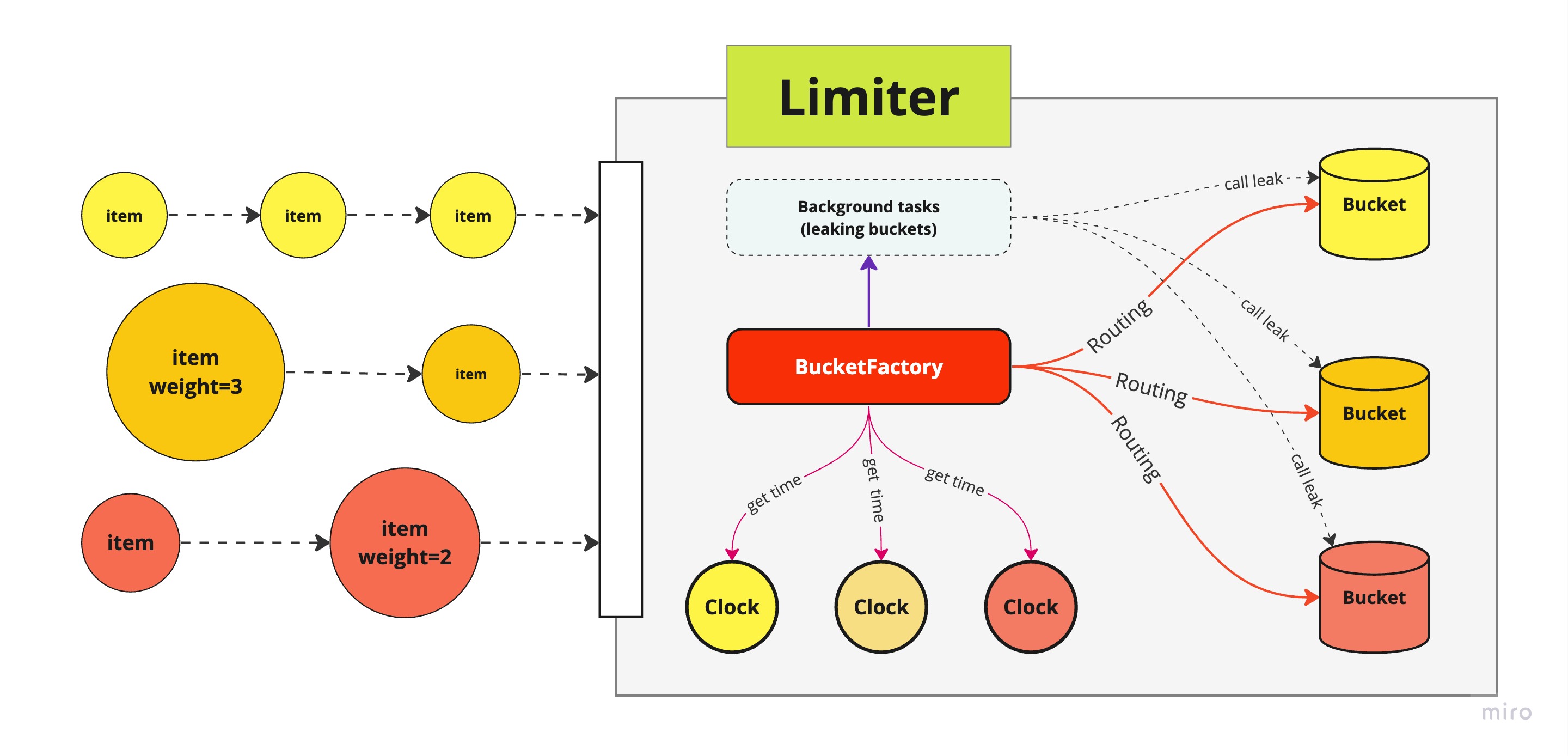
|
|
|
|
### Time sources
|
|
|
|
Time source can be anything from anywhere: be it python's built-in time, or monotonic clock, sqliteclock, or crawling from world time server(well we don't have that, but you can!).
|
|
|
|
```python
|
|
from pyrate_limiter import TimeClock # use python' time.time()
|
|
from pyrate_limiter import MonotonicClock # use python time.monotonic()
|
|
```
|
|
|
|
Clock's abstract interface only requires implementing a method `now() -> int`. And it can be both sync or async.
|
|
|
|
### Leaking
|
|
|
|
Typically bucket should not hold items forever. Bucket's abstract interface requires its implementation must be provided with `leak(current_timestamp: Optional[int] = None)`.
|
|
|
|
The `leak` method when called is expected to remove any items considered outdated at that moment. During Limiter lifetime, all the buckets' `leak` should be called periodically.
|
|
|
|
**BucketFactory** provide a method called `schedule_leak` to help deal with this matter. Basically, it will run as a background task for all the buckets currently in use, with interval between `leak` call by **default is 10 seconds**.
|
|
|
|
```python
|
|
# Runnning a background task (whether it is sync/async - doesnt matter)
|
|
# calling the bucket's leak
|
|
factory.schedule_leak(bucket, clock)
|
|
```
|
|
|
|
You can change this calling interval by overriding BucketFactory's `leak_interval` property. This interval is in **miliseconds**.
|
|
|
|
```python
|
|
class MyBucketFactory(BucketFactory):
|
|
def __init__(self, *args):
|
|
self.leak_interval = 300
|
|
```
|
|
|
|
When dealing with leak using BucketFactory, the author's suggestion is, we can be pythonic about this by implementing a constructor
|
|
|
|
```python
|
|
class MyBucketFactory(BucketFactory):
|
|
|
|
def constructor(self, clock, buckets):
|
|
self.clock = clock
|
|
self.buckets = buckets
|
|
|
|
for bucket in buckets:
|
|
self.schedule_leak(bucket, clock)
|
|
|
|
```
|
|
|
|
### Concurrency
|
|
|
|
Generally, Lock is provided at Limiter's level, except SQLiteBucket case.
|
|
|
|
### Custom backends
|
|
|
|
If these don't suit your needs, you can also create your own bucket backend by implementing `pyrate_limiter.AbstractBucket` class.
|
|
|
|
One of **PyrateLimiter** design goals is powerful extensibility and maximum ease of development.
|
|
|
|
It must be not only be a ready-to-use tool, but also a guide-line, or a framework that help implementing new features/bucket free of the most hassles.
|
|
|
|
Due to the composition nature of the library, it is possbile to write minimum code and validate the result:
|
|
|
|
- Fork the repo
|
|
- Implement your bucket with `pyrate_limiter.AbstractBucket`
|
|
- Add your own `create_bucket` method in `tests/conftest.py` and pass it to the `create_bucket` fixture
|
|
- Run the test suite to validate the result
|
|
|
|
If the tests pass through, then you are just good to go with your new, fancy bucket!
|
|
|